
Daily operations
Every ticket in a lane, every lane counted
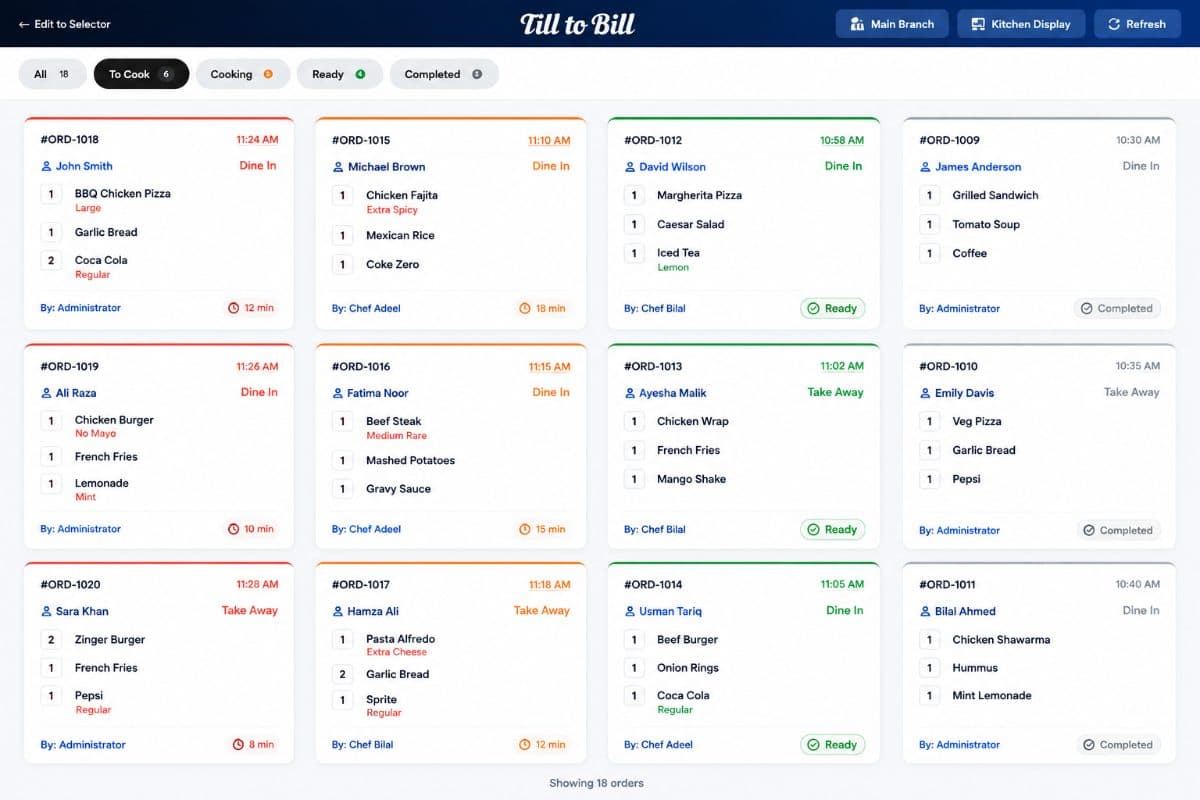
A kitchen screen with All, To Cook, Cooking, Ready and Completed lanes, live counts on each, and a per-branch filter so a shared kitchen sees only its own orders.
How it works
Ticket lands
The order arrives in To Cook the moment the till closes it, tagged with its table or order type.
Start making it
Move it to Cooking and the count on every lane updates.
Mark it ready
The ticket moves to Ready and appears on the Order Ready screen for collection.
What is included
Five status lanes
All, To Cook, Cooking, Ready and Completed, each with a live count at the top.
Order Ready screen
A separate customer-facing screen listing completed orders waiting to be collected.
Per-branch filter
One kitchen serving several branches shows only the tickets it is responsible for.
Void an item from the kitchen
Pull a line that cannot be made and the till and the order both know about it.
The kitchen stops asking the floor
Order type, table and any kitchen instruction travel with the ticket. Nobody walks to the pass to ask whether table nine is eat-in or takeaway.
- Table, order type and notes on every ticket
- Mark as collected closes the loop
- Runs on any Android tablet in the kitchen
Questions we get asked
See it on your own menu
Send your menu across and we will build it into a live demo till before the call.